Working with Data Frames
Introducing the Data Frame
- The dataset has four fields:
Name, Date, Grade and Price.
- Any variable in a dataset can be classified as either a numerical variable or categorical vairable.
- Categorical vairbles can be further split into nominal variables, ordinal variables.
- In Julia
size(df::DataFrame): return the size of DataFramenames(df::DataFrame): return the col names of DataFramefirst(df::DataFrame, n::Int): return the first n rows of DataFramedescribe(df::DataFrame): describe the DataFrame
using DataFrames, CSV
data = CSV.read("../data/purchaseData.csv", DataFrame, copycols = true)

println(size(data), "\n")
println(names(data), "\n")
println(first(data,6), "\n")
println(describe(data), "\n")
Referencing Data
using DataFrames, CSV
data = CSV.read("../data/purchaseData.csv", DataFrame, copycols = true)

println("Grade of person 1: ", data[1,3],
    ", ", data[1,:Grade],
    ", ", data.Grade[1], "\n")
println(data[[1,2,4],:], "\n")
println(data[13:15, :Name], "\n")
println(data.Name[13:15], "\n")
println(data[13:15, [:Name]])
Modifying Data
- Functions performed on a data frame will return a copy of that data frame. In other words, no underlying change will be made to the data frame object, but rather a shallow copy will be made and returned as output.
- By default, the columns of a data frame are immutable, which means that the values within them cannot be changed. In order to make changes to a column, the column must first be mutable. One way to do this is by including
copycols=true when a data frame is created from a csv file. This argument has the effect of making all columns mutable. Another way is by using ! when referencing the rows of a data frame. For example, df[!, :X] references the underlying data in column :X, while df[:,:X] simply references a shallow copy.
using DataFrames, CSV
data1 = CSV.read("../data/purchaseData.csv", DataFrame)
data2 = CSV.read("../data/purchaseData.csv", DataFrame, copycols=true)

try data1[1,:name] = "YARDEN" catch; @warn "Cannot: data1 is immutable" end;

data2[1,:Name] = "YARDEN"
println("\n",first(data2,3),"\n")

data1[!, :Price] ./= 1000
rename!(data1, :Price=>Symbol("Price(000's)"))
println(first(data1,3), "\n")

replace!(data2[!,:Grade], ["E"=>"F", "D"=>"E"]...)
println(first(data2,3),"\n")
Copying a Data Frame
using DataFrames, CSV
data1 = CSV.read("../data/purchaseData.csv", DataFrame, copycols=true)
println("Original value: ", data1.Name[1], "\n")

data2 = data1
data2.Name[1] = "EMILY"
@show data1.Name[1]

data1 = CSV.read("../data/purchaseData.csv", DataFrame, copycols=true)
data2 = copy(data1)
data2.Name[1] = "EMILY"
@show data1.Name[1]
println()

data1 = DataFrame()
data1.X = [[0,1], [100, 101]]
data2 = copy(data1)
data2.X[1][1] = -1
@show data1.X[1][1]

data1.X = [[0,1], [100, 101]]
data2 = deepcopy(data1)
data2.X[1][1] = -1
@show data1.X[1][1];
Handling Missing Entries
skipmissing(): skip all missing valuescoalesce.(dfc::DataFrameColumns, string::String): replace all missing with stringdropmissing(df::DataFrame, colName::Symbol): drop all cases which colName is missing valuecompletecases(df::DataFrame): judge whether a case contains missing or not
using Statistics, DataFrames, CSV
data = CSV.read("../data/purchaseData.csv", DataFrame, copycols=true)

println(mean(data.Price),"\n")
println(mean(skipmissing(data.Price)), "\n")
println(coalesce.(data.Grade, "QQ")[1:4], "\n")
println(first(dropmissing(data, :Price), 4), "\n")
println(sum(ismissing.(data.Name)), "\n")
println(findall(completecases(data))[1:4])
Reshaping, Joining, and Manipulating Data Frames
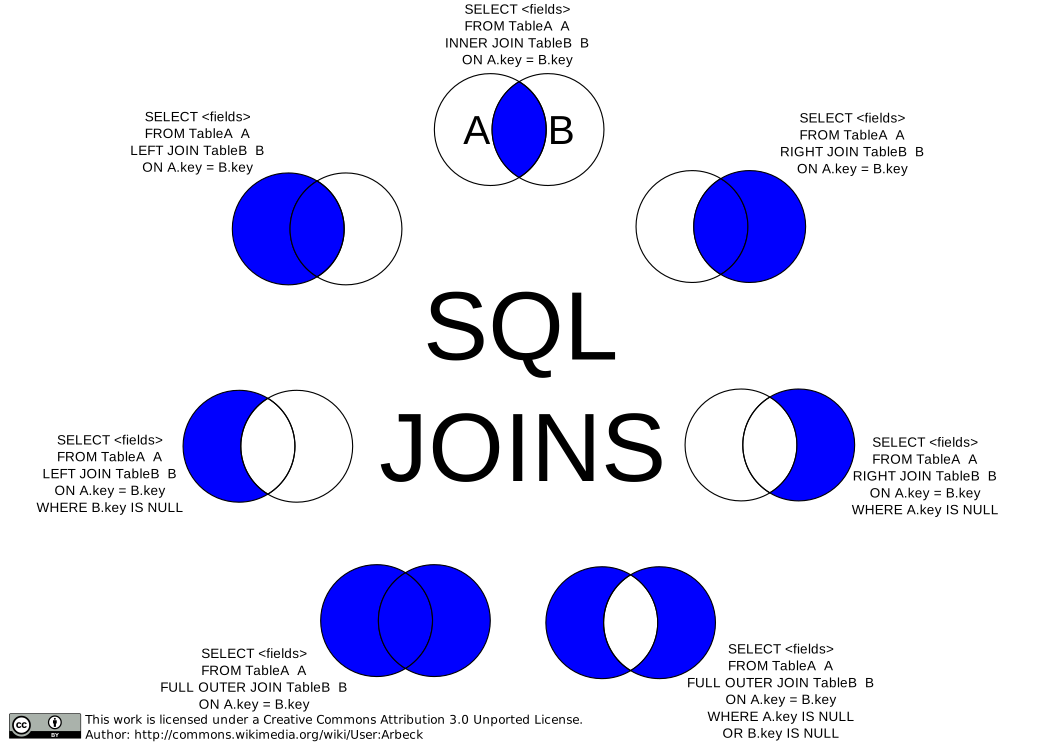
- Joins' style like SQL
innerjoin()outerjoin()rightjoin()leftjoin()
using Statistics, DataFrames, CSV
data = CSV.read("../data/purchaseData.csv", DataFrame, copycols=true)

newCol = DataFrame(Validated=ones(Int, size(data,1)))
newRow = DataFrame([["JOHN", "JACK"] [123456, 909595]],[:Name, :PhoneNo])
newData = DataFrame(Name=["JOHN", "ASHELY", "MARYANNA"],
    Job=["Lawyer", "Doctor", "Lawyer"])

data = hcat(data, newCol)
println(first(data,3), "\n")

data = vcat(data, newRow, cols=:union)
println(last(data,3), "\n")

data = innerjoin(data, newData, on = :Name, matchmissing=:equal)
println(data,"\n")

select!(data, [:Name, :Job])
println(data, "\n")

unique!(data, :Job)
println(data, "\n")
Useful Operations for Data Frames
using DataFrames, CSV, Dates, Statistics, CategoricalArrays
data = dropmissing(CSV.read("../data/purchaseData.csv", DataFrame, copycols=true))

data[!, :Date] = Date.(data[!,:Date], "d/m/y")
println(first(sort(data, :Date), 3), "\n")

println(first(filter(row -> row[:Price] > 5000, data), 3), "\n")

data[!,:Grade] = categorical(data[!,:Grade])
println(first(data, 3), "\n")

println(
    combine(groupby(data, :Grade),
    :Price => (x->length(x)) => :NumSold,
    :Price=> (x->mean(x)) => :AvgPrice)
)
A Cleaning and Imputation Example
- Instead of simply deleting rows, one way of dealing with
missing values is to use imputation. This involves substituting missing entries with velues based on either the data observed or according to some other logic.
- Example
using DataFrames, CSV, Statistics
data = CSV.read("../data/purchaseData.csv", DataFrame)

rowsKeep = .!(ismissing.(data.Grade) .& ismissing.(data.Price))
data = data[rowsKeep, :]

replace!(x -> ismissing(x) ? "QQ" : x, data.Name)
replace!(x -> ismissing(x) ? "31/06/2008" : x, data.Date)

grPr = combine(groupby(dropmissing(data) ,:Grade),
    :Price => (x -> round(mean(x), digits=-3)) => :AvgPrice)

d = Dict(grPr[:,1] .=> grPr[:,2])
nearIndx(v,x) = findmin(abs.(v.-x))[2]
for i in 1:nrow(data)
    if ismissing(data[i, :Price])
        data[i, :Price] = d[data[i, :Grade]]
    end
    if ismissing(data[i, :Grade])
        data[i, :Grade] = grPr[nearIndx(grPr[:,2], data[i, :Price]), :Grade]
    end
end

println(first(data,5),"\n")
println(describe(data))